Plik:Riemann sphere1.jpg
Przejdź do nawigacji
Przejdź do wyszukiwania
Rozmiar podglądu – 750 × 600 pikseli. Inne rozdzielczości: 300 × 240 pikseli | 600 × 480 pikseli | 960 × 768 pikseli | 1280 × 1024 pikseli.
Rozmiar pierwotny (1280 × 1024 pikseli, rozmiar pliku: 215 KB, typ MIME: image/jpeg)

|
Ta ilustracja ma także wersję wektorową („SVG”).
Zaleca się wykorzystywanie w galeriach dostępnej wersji wektorowej zamiast obecnej. File:Riemann sphere1.jpg → File:Riemann sphere1.svg
Więcej o grafice wektorowej przeczytasz w artykule Przenoszenie grafik Commons do formatu SVG. Dostępna jest także informacja o obsłudze grafik SVG przez MediaWiki. |
 |


Opis
| Opis |
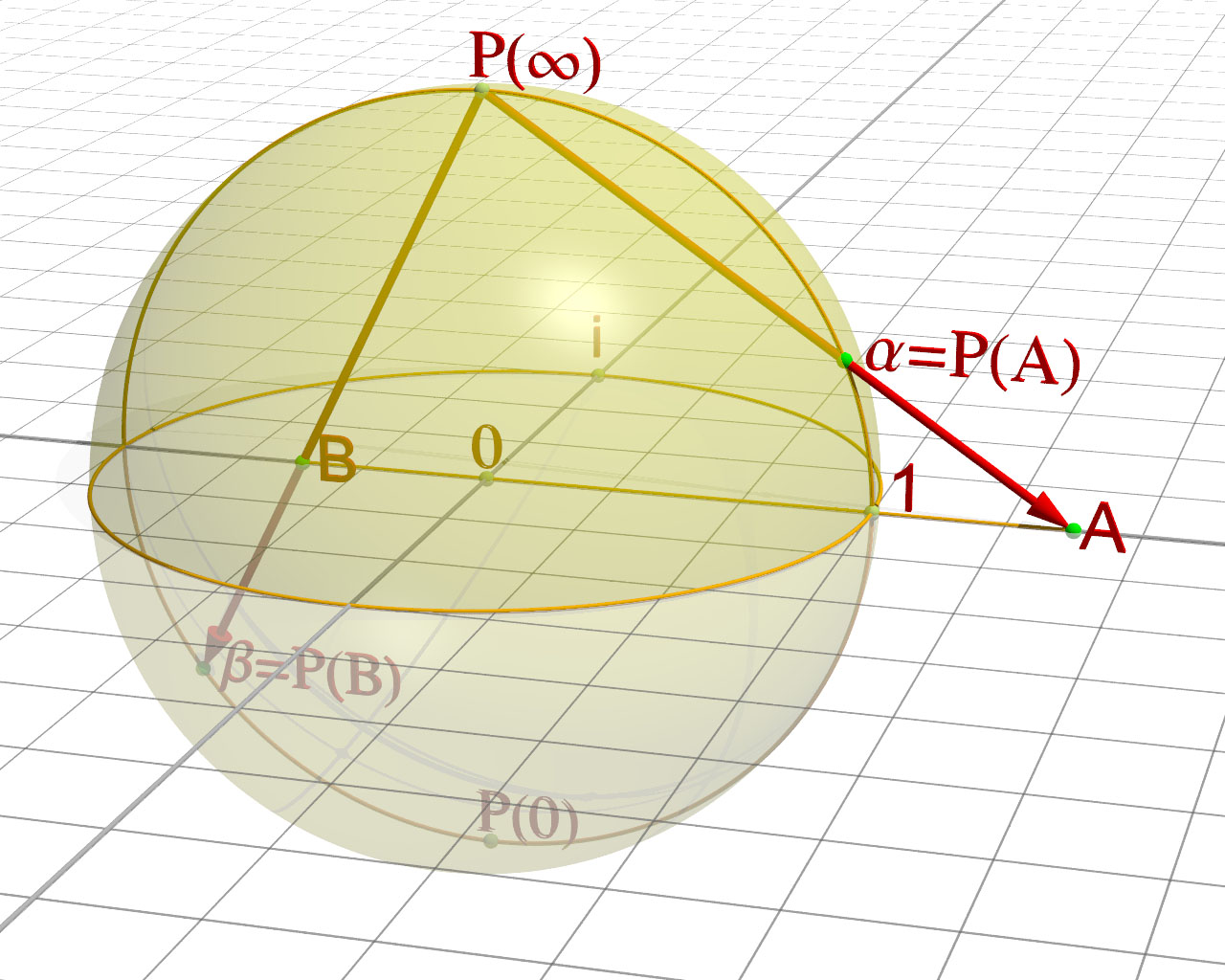
Sphère de Riemann, démonstration de la projection English: rendering of the graph of the Sphere of Rieman |
| Źródło | Praca własna. Merci à Friedrich A. Lohmüller pour sa bibliothèque POV. |
| Autor | Jean-Christophe BENOIST |
//------------------------------------------------------------------------
#version 3.6;
global_settings {  assumed_gamma 1 }
//------------------------------------------------------------------------
#include "colors.inc"
#include "textures.inc"
#include "glass.inc"
#include "metals.inc"
#include "golds.inc"
#include "stones.inc"
#include "woods.inc"
#include "shapes.inc"
#include "shapes2.inc"
#include "functions.inc"
#include "math.inc"
#include "transforms.inc"
//------------------------------------------------------------------------
#declare Camera_0 = camera {                                 // xy-view
                             angle 20
                             location  <8.0 , 8.0 ,-24.0>
                             right     x*image_width/image_height
                             look_at   <1 , 0 , 0>
                           }

#declare Camera_1 = camera {                                // diagonal view
                             angle 9
                             location  <15.0 ,15 ,-60.0>
                             right     x*image_width/image_height
                             look_at   <1 , 0 , 0>
                           }
#declare Camera_2 = camera {                               // yz-view
                             angle 20
                             location  <31.0 , 7.0 ,1.0>
                             right     x*image_width/image_height
                             look_at   <0 , 0 , 0>
                           }
#declare Camera_3 = camera {
                             angle 20
                             location  < 0.0 , 37.5 ,-0.0001>
                             right     x*image_width/image_height
                             look_at   <0 , 0 , 0>
                           }

camera{Camera_0}

//------------------------------------------------------------------------
// sun -------------------------------------------------------------------
light_source{<3000,5500,-1000> color White }
// sky -------------------------------------------------------------------
sky_sphere{ pigment{ gradient <0,1,0>
                     color_map{ [0   color rgb<1,1,1>         ]//White
                                [0.4 color rgb<1,1,1>]  //~Navy
                                [0.6 color rgb<1,1,1>]  //<0.14,0.14,0.56>]//~Navy
                                [1.0 color rgb<1,1,1>         ]//White
                              }
                     scale 2 }
           } // end of sky_sphere
//------------------------------------------------------------------------


//------------------------------ the Axes --------------------------------
//------------------------------------------------------------------------
#macro Axis_( AxisLen, Dark_Texture,Light_Texture)
 union{
    cylinder { <0,-AxisLen-3,0>,<0,AxisLen,0>,0.017
               texture{checker texture{Dark_Texture }
                               texture{Light_Texture}
                       translate<0.1,0,0.1>}
             }
    cone{<0,AxisLen,0>,0.1,<0,AxisLen+0.3,0>,0
          texture{Dark_Texture}
         }
     } // end of union
#end // of macro "Axis()"
//------------------------------------------------------------------------
#macro AxisXYZ( AxisLenX, AxisLenY, AxisLenZ, Tex_Dark, Tex_Light)
//--------------------- drawing of 3 Axes --------------------------------
union{
#if (AxisLenX != 0)
 object { Axis_(AxisLenX, Tex_Dark, Tex_Light)   rotate< 0,0,-90>}// x-Axis
 text   { ttf "arial.ttf",  " ",  0.15,  0  texture{Tex_Dark}
          scale 0.5 translate <AxisLenX+0.05,0.4,-0.10>}
#end // of #if
#if (AxisLenY != 0)
 object { Axis_(AxisLenY, Tex_Dark, Tex_Light)   rotate< 0,0,  0>}// y-Axis
 text   { ttf "arial.ttf",  "z",  0.15,  0  texture{Tex_Dark}
           scale 0.5 translate <-0.55,AxisLenY+0.20,-0.10>}
#end // of #if
#if (AxisLenZ != 0)
 object { Axis_(AxisLenZ, Tex_Dark, Tex_Light)   rotate<90,0,  0>}// z-Axis
 text   { ttf "arial.ttf",  " ",  0.15,  0  texture{Tex_Dark}
               scale 0.5 translate <-0.55,0.1,AxisLenZ+0.10>}
#end // of #if
} // end of union
#end// of macro "AxisXYZ( ... )"
//------------------------------------------------------------------------

#declare Texture_A_Dark  = texture {
                               pigment{color rgb<0.5,0.5,0.5>}
                               finish {ambient 0.15 diffuse 0.85 phong 1}
                             }
#declare Texture_A_Light = texture {
                               pigment{color rgb<1,1,1>}
                               finish {ambient 0.15 diffuse 0.85 phong 1}
                             }


object{ AxisXYZ( 25.0, 0, 25.0, Texture_A_Dark, Texture_A_Dark)} // <<<<<<<<<<<<<<<<< adapt the axes here !!!


#declare        TextScale=0.5;

//-------------------------------------------------- end of coordinate axes


// ground -----------------------------------------------------------------
//---------------------------------<<< settings of squered plane dimensions
#declare RasterScale = 2.0/2;
#declare RasterHalfLine  = 0.03/4;
#declare RasterHalfLineZ = 0.03/2;
//-------------------------------------------------------------------------
#macro Raster(RScale, HLine)
       pigment{ gradient x scale RScale
                color_map{[0.000   color rgbt<1,1,1,1>*0.2]
                          [0+HLine color rgbt<1,1,1,1>*0.2]
                          [0+HLine color rgbt<1,1,1,1>]
                          [1-HLine color rgbt<1,1,1,1>]
                          [1-HLine color rgbt<1,1,1,1>*0.2]
                          [1.000   color rgbt<1,1,1,1>*0.2]} }
       finish { ambient 0.15 diffuse 0.85}
 #end// of Raster(RScale, HLine)-macro
//-------------------------------------------------------------------------


plane { <0,1,0>, 0    // plane with layered textures
        texture { pigment{color rgbt<1,1,1,0.7>*1.1}
                  finish {ambient 0.45 diffuse 0.85}}
        texture { Raster(RasterScale,RasterHalfLine ) rotate<0,0,0> }
        texture { Raster(RasterScale,RasterHalfLineZ) rotate<0,90,0>}
        rotate<0,0,0>
        no_shadow
      }
//------------------------------------------------ end of squered plane XZ


//
//------------------------------------------------------------------------------------
#include "analytical_g.inc"


//--------------------------------------------------------------------------
//---------------------------- objects in scene ----------------------------
//--------------------------------------------------------------------------
#default{ finish {ambient 0.15 diffuse 0.85} } //


//-----------------------------------------------------------------------------------
#declare Rl  = 0.035; // radius of lines  - Radius der Strecken
#declare Rp  = 0.06; // radius of points - Radius der Punkte


//------------------------------------------------------------------------------------
// -----------------------------------------------------------------------------------

// -----------------------------------------------------------------------------------
// ---------------------  Punti e Vettori  - Punkte und Vektoren -  Points and Vectors
//------------------------------------------------------------------------------------

#declare M1 = < 0, 0.0,0.0>;
#declare R1  = 3;

#declare M2  = < 0.0,0.0, 0.0>;
#declare Rx  = 3.00;
#declare Ry  = 1.00;
#declare Rz  = 2.00;

#declare P1   = < 3, 0, 0>;
#declare Pi   = < 0, 0, 3>;
#declare PPinf = < 0, 3, 0>;
#declare PP0   = < 0, -3, 0>;
#declare P0   = <0,0,0>;

sphere{ P1, Rp  pigment{color YellowGreen}}
text { ttf "arial.ttf", "1",0.1,0
       scale TextScale rotate<0,0,0> translate P1+<0.2,0.1,-0.2> pigment{ color Red } no_shadow}


sphere{ Pi, Rp  pigment{color YellowGreen}}
text { ttf "arial.ttf", "i",0.1,0
       scale TextScale rotate<0,0,0> translate Pi+<-0.1,0.1,0.2> pigment{ color Red } no_shadow}


sphere{ PPinf, Rp  pigment{color YellowGreen}}
text { ttf "Mathematica1.ttf", concat("R(",chr(165),")"),0.1,0
       scale TextScale rotate<0,0,0> translate PPinf+<-0.1,0.1,0> pigment{ color Red } no_shadow}


sphere{ PP0, Rp  pigment{color YellowGreen}}
text { ttf "Mathematica1.ttf", "R(0)",-0.1,0
       scale TextScale rotate<0,0,0> translate PP0+<-0.1,0.1,0> pigment{ color Red } no_shadow}

sphere{ P0, Rp  pigment{color YellowGreen}}
text { ttf "Mathematica1.ttf", "0",-0.1,0
       scale TextScale rotate<0,0,0> translate P0+<-0.1,0.1,0> pigment{ color Red } no_shadow}


//object{ Show_Yxz( M1, Rl/2) pigment{ color Yellow }}
//object{ Show_Yxz( M2, Rl/2) pigment{ color Yellow }}
//------------------------------------------------------------------------------------
// --------------------------------------------------------------- Zeichnen ----------
// ---------------------------------------------------------------- Drawing ----------


#declare RSphere=
object {
        sphere{ M1, R1                          pigment{ color Yellow transmit 0.6 } finish {phong 0.3}}
}


#declare PPlan1 = <4.5,0,0>;

object{ Vector (PPinf, PPlan1, Rl)
         pigment{color Red}}

sphere{ PPlan1, Rp  pigment{color Green}}
object{ Show_Yxz( PPlan1, Rl/2)
        pigment{ color Orange }}
text { ttf "arial.ttf", "A",0.1,0
       scale TextScale rotate<0,0,0> translate PPlan1+<0.1,0.0,-0.4> pigment{ color Red } no_shadow}

// point of intersection
#declare Hit_the_Object =  trace ( RSphere, PPinf, PPlan1 - PPinf );

sphere{ Hit_the_Object, Rp  pigment{color Green}}
text { ttf "Mathematica1.ttf", "a=R(A)",0.1,0
       scale TextScale rotate<0,0,0> translate Hit_the_Object+<0.2,0.0,-0.2> pigment{ color Red } no_shadow}


#declare PPlan2 = <-1.5,0,0>;


sphere{ PPlan2, Rp  pigment{color Green}}
object{ Show_Yxz( PPlan2, Rl/2)
        pigment{ color Orange }}
text { ttf "arial.ttf", "B",0.1,0
       scale TextScale rotate<0,0,0> translate PPlan2+<0.3,0.0,-0.4> pigment{ color Red } no_shadow}

// point of intersection
#declare Hit_the_Object =  trace ( RSphere, PPinf, PPlan2 - PPinf );

object{ Vector (PPinf, Hit_the_Object, Rl)
         pigment{color Red}}

sphere{ Hit_the_Object, Rp  pigment{color Green}}
text { ttf "Mathematica1.ttf", "b=R(B)",0.1,0
       scale TextScale rotate<0,0,0> translate Hit_the_Object+<0.2,0.0,-0.2> pigment{ color Red } no_shadow}


object {RSphere}
Licencja
Ja, właściciel praw autorskich do tego dzieła, udostępniam je na poniższych licencjach

|
Udziela się zgody na kopiowanie, rozpowszechnianie oraz modyfikowanie tego dokumentu zgodnie z warunkami GNU Licencji Wolnej Dokumentacji, w wersji 1.2 lub nowszej opublikowanej przez Free Software Foundation; bez niezmiennych sekcji, bez treści umieszczonych na frontowej lub tylnej stronie okładki. Kopia licencji załączona jest w sekcji zatytułowanej GNU Licencja Wolnej Dokumentacji. |
  
|
Ten plik udostępniony jest na licencji Creative Commons Uznanie autorstwa – Na tych samych warunkach 3.0. | |
| ||
| Ten szablon został dodany jako element zmiany licencjonowania. |

Ten plik jest udostępniany na licencji Creative Commons Uznanie autorstwa – na tych samych warunkach 2.5 zlokalizowana, 2.0 zlokalizowana oraz 1.0 zlokalizowana.
- Wolno:
- dzielić się – kopiować, rozpowszechniać, odtwarzać i wykonywać utwór
- modyfikować – tworzyć utwory zależne
- Na następujących warunkach:
- uznanie autorstwa – musisz określić autorstwo utworu, podać link do licencji, a także wskazać czy utwór został zmieniony. Możesz to zrobić w każdy rozsądny sposób, o ile nie będzie to sugerować, że licencjodawca popiera Ciebie lub Twoje użycie utworu.
- na tych samych warunkach – Jeśli zmienia się lub przekształca niniejszy utwór, lub tworzy inny na jego podstawie, można rozpowszechniać powstały w ten sposób nowy utwór tylko na podstawie tej samej lub podobnej licencji.
Możesz wybrać, którą licencję chcesz zastosować.
Historia pliku
Kliknij na datę/czas, aby zobaczyć, jak plik wyglądał w tym czasie.
| Data i czas | Miniatura | Wymiary | Użytkownik | Opis | |
|---|---|---|---|---|---|
| aktualny | 17:11, 4 cze 2007 | | 1280 × 1024 (215 KB) | wikimediacommons>Jean-Christophe BENOIST | == Description == {{Information |Description=Sphère de Riemann, démonstration de la projection |Source=Oeuvre personnelle. Merci à Friedrich A. Lohmüller pour sa bibliothèque POV. |Date= |Author=[[:fr:User:Jean-Christophe BENOIST|Jean-Christophe BENO |
Lokalne wykorzystanie pliku
Poniższa strona korzysta z tego pliku:
